AI-Powered Bookkeeping

Mail2Ledger

Turn Gmail Invoices Into a Google Sheets Ledger, Automatically

No templates. No training. Works on any invoice format, any language.

You get invoices in Gmail. Typing them into a spreadsheet is a waste of your time. Mail2Ledger reads the email or PDF, extracts the data, and adds it to Google Sheets in one click.

Early Access. 100% free during beta. Pricing may apply in the future.

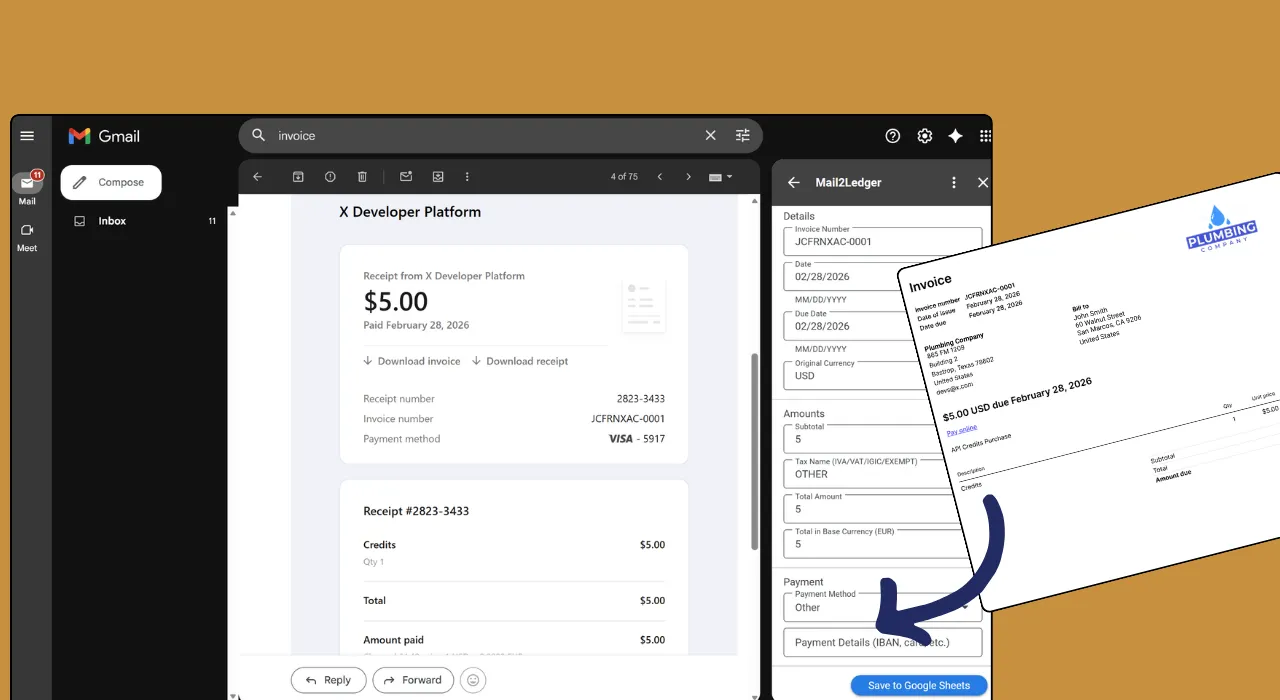
Mail2Ledger Gmail add-on extracting invoice data from a PDF attachment in the sidebar

Mail2Ledger reads the invoice in the Gmail sidebar and extracts all financial fields automatically.

How It Works in 3 Steps

1

Open Any Invoice

Open any email with an invoice, whether the data is in the email body or a PDF attachment. No forwarding needed. Just click the Mail2Ledger sidebar and let AI extract everything.

2

Review & Verify

Check the extracted amounts, taxes, vendor name, dates, and other fields. Edit anything that needs a tweak before it hits your spreadsheet.

3

Auto-Sync to Sheets

One click and the row appears in your Google Sheet instantly. Amounts, dates, vendor, taxes, all in the right columns, ready for reporting.
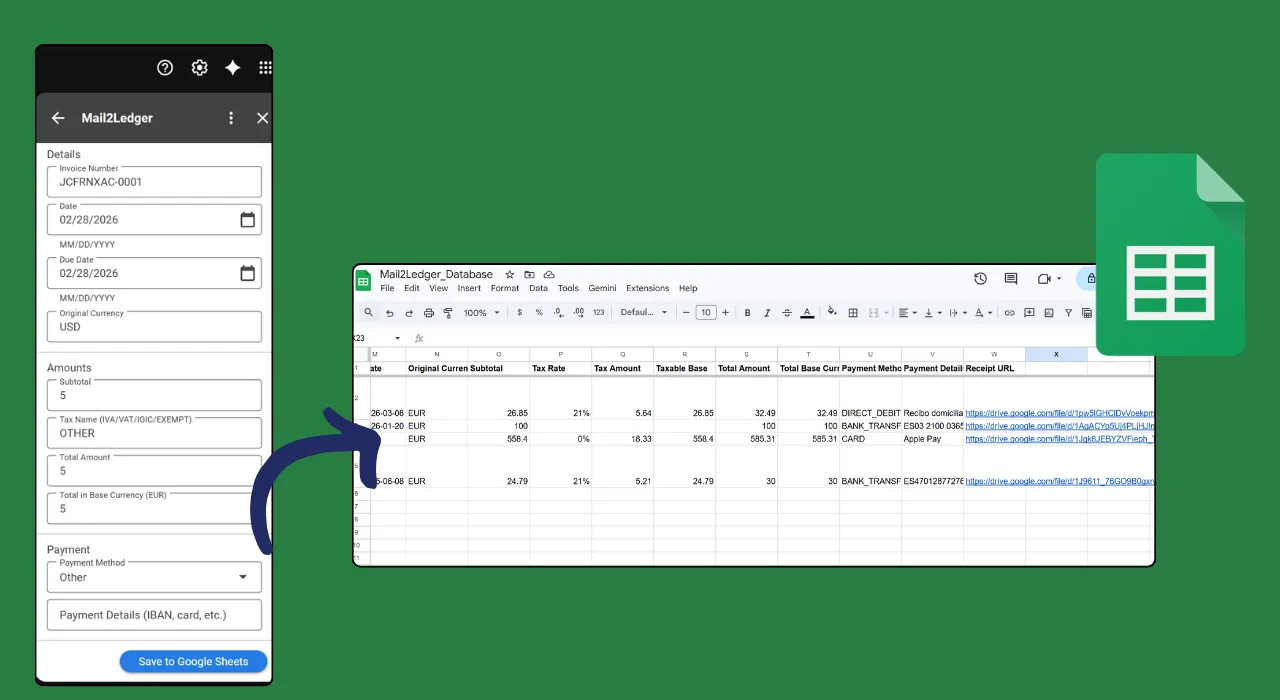
Mail2Ledger syncing extracted invoice data to a Google Sheets ledger with one click

Extracted data syncs directly to your Google Sheet. One click, one new row.

Built For People Who Process Invoices

Freelancers & Contractors

Stop spending Sunday evenings typing invoices into spreadsheets. Mail2Ledger logs every client payment and expense as it arrives. Tax time takes minutes, not days.

Small Business Owners

You get dozens of supplier invoices a month. Instead of copy-pasting amounts and dates, open the email and let Mail2Ledger do it in one click.

Accountants

Process a stack of client invoices in minutes instead of hours. Every row lands in Google Sheets with amounts, taxes, and vendor details already filled in.

What Makes Mail2Ledger Different

Gemini AI Extraction

Advanced AI understands context and extracts accurate financial data even from messy or unstructured emails.

PDF Processing

Analyze PDF invoices, receipts, and attachments in addition to email text. Extract data from all financial documents.

Real-Time Sync

Verified transactions sync instantly to Google Sheets. Your ledger is always current and audit-ready.

Multi-Currency Support

Handle invoices in different currencies. Mail2Ledger recognizes and categorizes international transactions.

Tax Data Extraction

AI-assisted extraction captures VAT numbers, tax amounts, and other compliance information for easier reporting.

No Templates Needed

Unlike traditional tools, Mail2Ledger doesn't need pre-built templates. It understands any invoice format from any supplier, in any language, out of the box.

Ready to automate your bookkeeping?

Free during early access. Install in seconds, no credit card required.

Install from Marketplace

Frequently Asked Questions

What financial data can Mail2Ledger extract?
Mail2Ledger extracts invoice amounts, taxes, VAT numbers, vendor names, dates, payment terms, descriptions, and more from both email bodies and PDF attachments. It automatically categorizes transactions for your accounting needs.
Does it work with PDF invoices and attachments?
Absolutely! Mail2Ledger analyzes both email text and PDF attachments. It can extract data from invoices, receipts, expense reports, and other financial documents automatically.
How does the Google Sheets sync work?
Mail2Ledger syncs directly to a Google Sheet. Each extracted transaction is added as a new row with all relevant data in designated columns. Updates happen in real-time as you process emails.
Can I customize the spreadsheet columns?
Yes! You can customize which columns appear in your spreadsheet. Mail2Ledger defaults to essential fields like date, amount, vendor, and category, but you can add or remove columns as needed.
Is my financial data secure?
Your privacy and security are paramount. Mail2Ledger only processes emails you explicitly select. Data is securely analyzed by Gemini AI and never stored on our servers or used for any other purpose.
Can Mail2Ledger handle multiple currencies?
Yes! Mail2Ledger recognizes multiple currency formats and symbols. You can configure your default currency, and transactions in other currencies are flagged for review.

Stop Doing Manual Data Entry

Every invoice you type manually is time you don't get back. Mail2Ledger is free during early access. Install it now and reclaim your hours.

Install from Marketplace