Follow Up on a Quote Without Being Annoying
You sent the quote five days ago. It was exactly what they asked for. Fair price. Clear scope. You even included the FAQ answers from your last call.
Silence.
Now you are stuck in the least productive loop in business: refresh inbox, glance at the thread, tell yourself “I will send something tomorrow,” open a blank reply, write the words “Just following up,” delete them, close the tab.
Figuring out how to follow up on a quote without being annoying is a soft skill nobody teaches and everyone needs. The default options both feel bad: stay silent and risk the deal drifting away, or chase too hard and push the prospect toward a competitor who is less pushy. The good news is there is a real middle path: specific timing, specific language, and automation that handles the clock for you.
- Why most follow-ups feel annoying (it's not the frequency)
- What the data says: 80% of deals need 5+ follow-ups
- The exact timing windows for quotes, proposals, and invoices
- A 4-part framework for follow-ups that add value
- Three ready-to-adapt email templates
- How to automate tracking without losing the human touch
- The six mistakes that make follow-ups annoying
Why Follow-ups Feel Annoying (And When They Actually Are)
Annoyance is not about frequency. It is about two specific things: tone and content.
The emails that make prospects wince share a pattern. They are short, vague, and centred on the sender. “Just bumping this up.” “Did you get a chance to look at this?” “Checking in to see if you had any questions.” Every one of those lines reads as “please make me feel better about my inbox anxiety.” None of them give the reader a reason to reply.
A follow-up becomes annoying when it adds noise without adding value. The same email, sent with a concrete reason for re-surfacing the thread, lands as helpful: a new piece of information, a specific question, a gentle deadline update, or a clarifying change to the offer. Frequency is almost never the real problem. Empty follow-ups are.
One exception: following up within 24 hours of the original quote reliably feels rude because it signals you expect the prospect to drop everything. Space matters as much as timing.
What the Data Actually Says About Follow-ups
Most people follow up too little, not too much. The numbers are lopsided.
According to sales research compiled in Invesp’s follow-up study, roughly 80% of sales require five or more follow-ups to close, while 44% of salespeople give up after just one. A proposal or quote that goes quiet after the first send is overwhelmingly normal, and the only reason it looks like an ending is that almost no one keeps going.
HubSpot sales research similarly shows that response rates for a well-timed second message are often higher than for the first cold touch. The second arrival jogs a real memory rather than a new introduction.
Put together, the situation is not “if I follow up, I am being annoying.” It is “if I do not follow up the right way, I am one of the 44% who quietly loses the deal.”
Timing: When to Send a Follow-up Email by Type
Not every email needs the same cadence. A tax invoice, a prospecting pitch, and a signed-off contract all carry different implicit deadlines. Using the same five-day window for all of them makes the wrong ones feel urgent and the right ones feel cold.
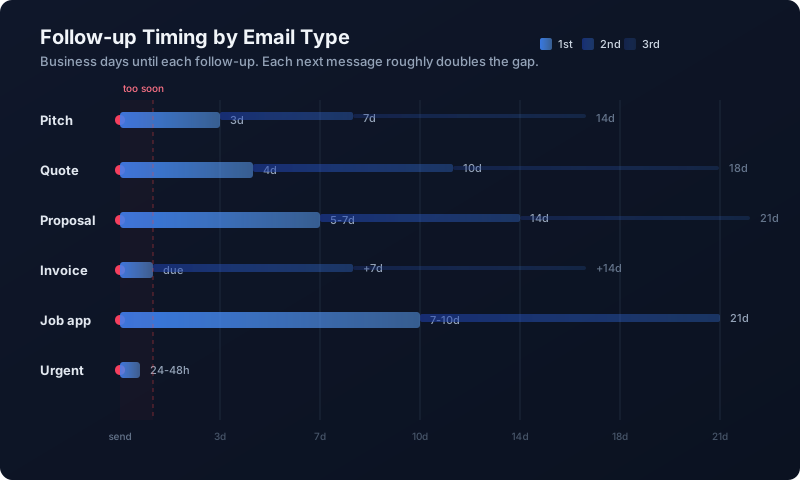
Here is a timing framework that works in practice for business email:
- Prospecting pitch (cold outreach): First follow-up after 3 business days. Second after 7. Third after 14. Stop after three.
- Quote or estimate: First follow-up after 4 business days. The prospect has asked you for this, so they are interested, but they are also busy. Four days is long enough to not seem anxious and short enough to catch the decision window.
- Proposal or SOW: First follow-up after 5 to 7 business days. Proposals usually need internal review on the recipient’s side. Anything sooner signals impatience.
- Invoice: First gentle reminder on the due date or one day after. Second, firmer reminder at 7 days past due. Escalate at 14.
- Job application or partnership pitch: First follow-up after 7 to 10 business days. These decisions usually move slowly and rarely benefit from being pushed.
- Urgent request (deadline-sensitive): 24 to 48 hours is fine, as long as the urgency is real and named.
The general rule: each follow-up roughly doubles the gap of the one before. That cadence matches the way attention works and keeps messages from clustering so tightly they feel aggressive.
The Framework for Follow-ups That Actually Work
Good follow-ups share four properties. If any one is missing, the message risks feeling empty.
Not “checking in,” but a concrete trigger like a deadline or capacity window.
Remind the reader which quote, project, or file. One line is enough.
One question, one action. Pick the one that moves the deal forward.
Make it easy to answer in one sentence. Yes/no beats open-ended.
Notice what is not on the list: apologies for “bothering” the reader, self-deprecating padding, or hedge words like “just” and “kind of.” Those soften the message into wallpaper. Good follow-ups are warm, but they are not meek.
Three Follow-up Email Templates That Work
Templates are scaffolding, not scripts. Adapt tone and specifics to your voice. Every one of these should be shorter than the original email it follows.
Quote Follow-up (4 Days Later)
Hi Maria,
Quick note on the quote I sent last Thursday for the Q2 landing page refresh (£4,200, delivery 3 weeks from kick-off).
I am holding capacity open for a May start, but the slot usually books within a week or so once a quote is out. If the scope or the number needs any tweaks, I am happy to turn around a revised version in 24 hours.
Is May 6 still a realistic kick-off on your side, or should I hold the slot?
Why it works: references the exact quote, surfaces a real constraint (the slot), and offers a yes/no path forward that is easy to answer without feeling cornered.
Proposal Follow-up (5 to 7 Days Later)
Hi Ana,
Wanted to bring the onboarding proposal back to the top of your inbox. Since I sent it, two things have shifted that might be useful:
- We wrapped a similar rollout for a SaaS client last week. Happy to share the final benchmarks if they would help your internal case.
- If legal review on your side is a constraint, I can front-load the MSA so the paperwork clears in parallel with the kick-off.
What would be most useful next: a quick call this week, or should I send the benchmarks directly?
Why it works: adds new value (benchmarks, legal workflow) rather than repeating the original ask, and gives two concrete options to choose between rather than an open-ended “let me know.”
Invoice Follow-up (7 Days Past Due)
Hi Tom,
Invoice #2043 from April 1 (£1,850) is showing as a week past due on my side. Totally get that things slip, so I wanted to flag it in case it needs a forward to accounts.
If there is any issue with the line items, happy to reissue. Otherwise, a quick confirmation the invoice is in the queue would be great.
Why it works: professional but firm, offers a graceful out (“forward to accounts”), and asks for a one-sentence confirmation rather than payment itself.
How to Automate the Tracking Without Losing the Human Touch
The hardest part of following up is not writing the email. It is remembering to write the email on the right day. That part is pure admin, and it is exactly the thing that quietly falls apart when you are juggling a dozen open threads.
This is where tooling earns its keep. Mail2Follow is a Chrome extension for Gmail built around this specific workflow. After you send an email, a toast appears in the corner asking if you want to track it. One click and the thread is watched.
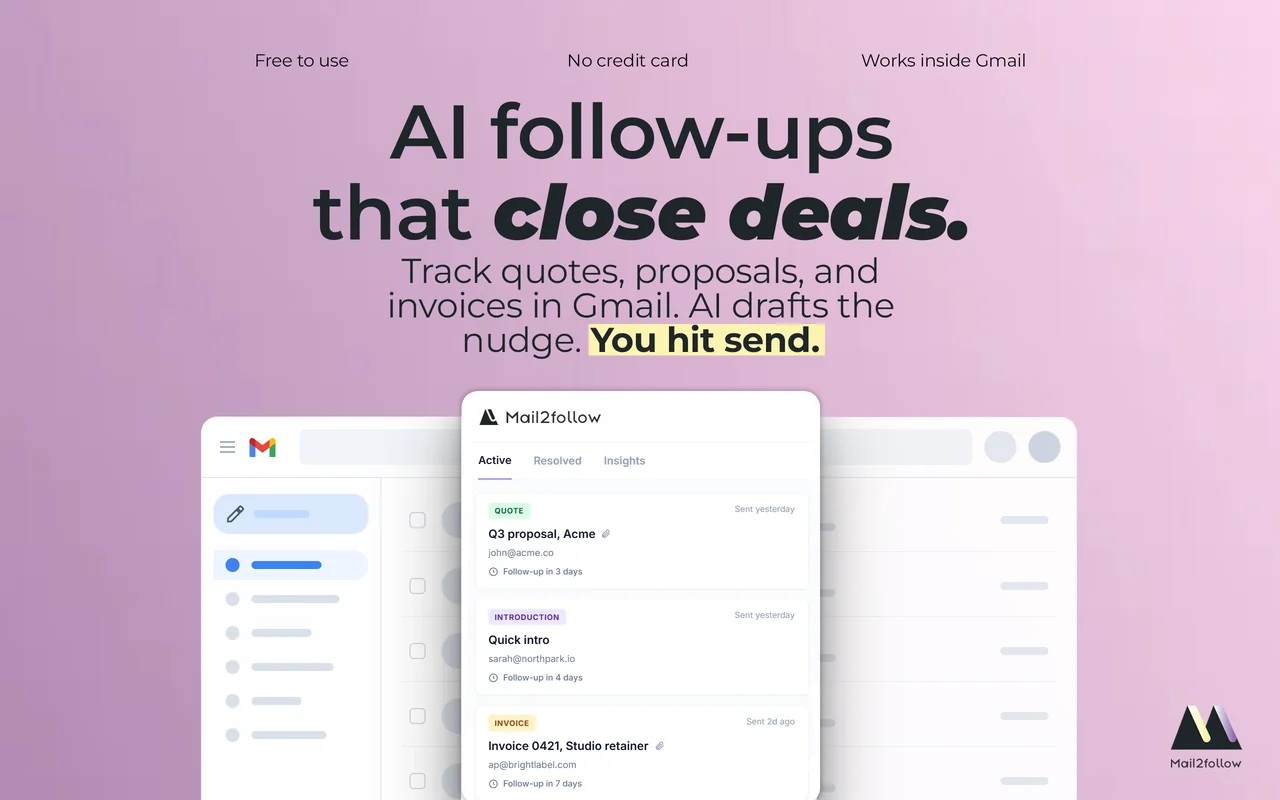
Three things happen in the background:
The AI reads the outgoing email, recognises whether it is a quote, a proposal, an invoice, a pitch, or something else, and sets a default follow-up date based on the timing framework above. You can change the date with one click if your context calls for something different.
If the recipient replies on the thread, the follow-up is resolved and disappears from your queue. You never have to manually close loops, and you never get a nagging reminder to follow up on an email they already answered.
Mail2Follow surfaces the thread with a ready-to-edit follow-up that references the original email, writes in the same language it was sent in, and matches the register of the original. You open it, edit as needed, and send.
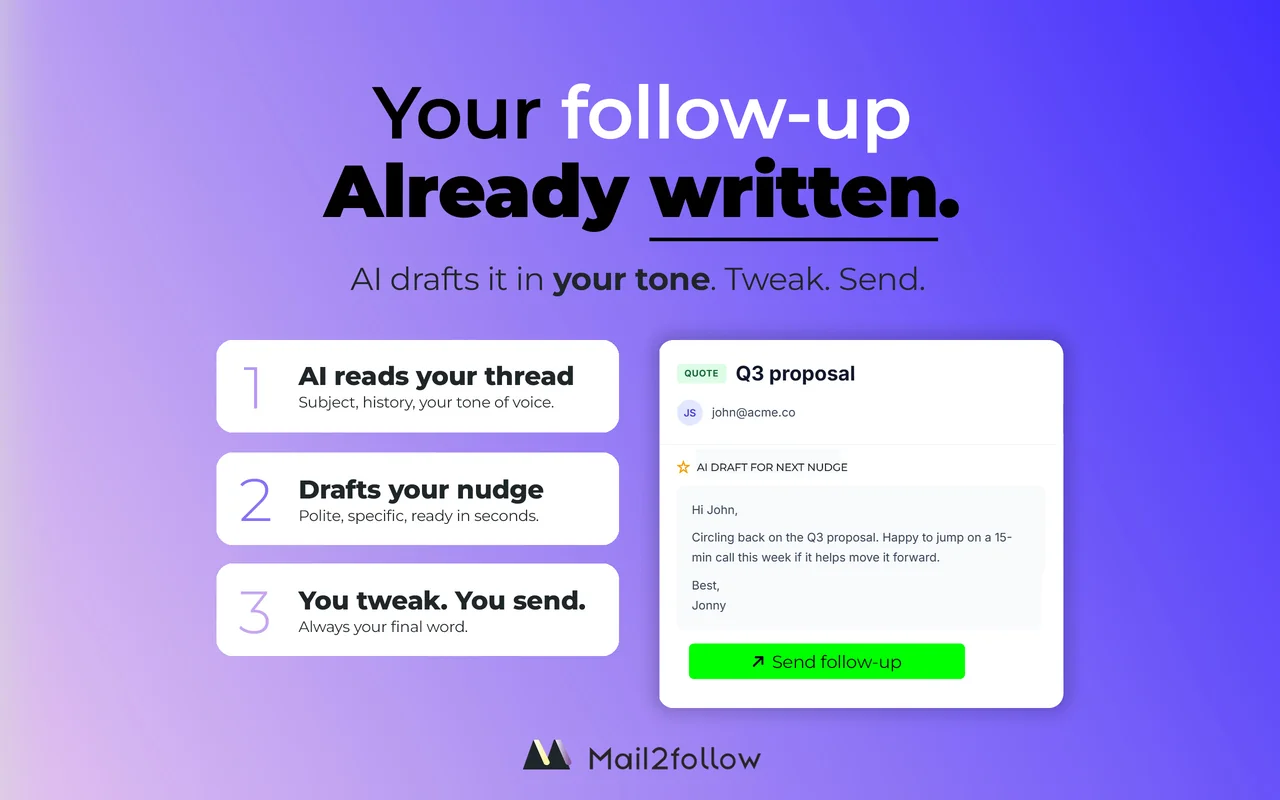
The benefit is not that a robot writes your follow-ups. It is that the tracking, timing, and first draft are handled, so the human energy goes into the one part that actually matters: the specific, value-adding line that only you can write.
For the adjacent problem of meetings confirmed in email but never making it to the calendar, Mail2Cal handles the same “parse the thread, build the thing you meant to build” workflow for Google Calendar. If scheduling also happens inside conversations, the post on handling unplanned meetings in Gmail without Calendly covers that ground.
Common Mistakes That Turn Follow-ups Annoying
A few patterns come up again and again in the follow-ups that earn eye-rolls:
Twenty-four hours after a quote is not a follow-up. It is anxiety. Let the week breathe.
If the whole email could be copied into any other thread unchanged, it is not a real follow-up. It is throat-clearing.
“Let me know about the scope, pricing, timeline, and whether you want to move to a call” is four emails pretending to be one. You will get zero answers.
Opening a follow-up with “Hi Ana, reaching out to see if you have any interest” on a thread where you already sent a full proposal makes the prospect feel like a CRM entry, not a person.
If three follow-ups have not worked, the answer is probably “not now.” A shift in angle, for example from proposal-focused to relationship-focused, can revive a dead thread. Another “just checking in” will not.
“I assume you are not interested since I have not heard back” closes a door the prospect hoped would stay open. The better version: “If now is not the right time, happy to circle back in Q3.” One sentence, zero guilt-trip.
Frequently Asked Questions
How many times should I follow up on a quote before giving up?
Three is a reasonable ceiling for a single quote. First at 4 business days, second around day 10, third around day 18 to 21. After that, a soft “closing the loop” email inviting future re-engagement is more effective than another nudge.
What is the best subject line for a follow-up email?
Keep it specific to the original thread rather than generic. “Quote for the Q2 redesign, quick check-in” beats “Following up.” Even better: reply inside the existing thread so the subject line stays the same and the prospect instantly knows the context. Only start a new thread if the old one has been buried for weeks.
Should I follow up by email or phone?
Default to email for the first and second follow-up. It is lower-pressure and easier to respond to. If the deal is large and the relationship is warm, a single well-timed phone call on the second or third attempt often breaks the silence faster than another email. Avoid phone calls for cold prospects; they usually land as intrusive.
How do I remind a client to reply to an email without sounding pushy?
Reference something specific from the original email, give a concrete reason the thread needs to move now (a deadline, a capacity window, a change in context), and ask one easy-to-answer question. Keep it under 80 words. The shorter and more specific the follow-up, the less pushy it feels.
Can automation really follow up in my voice without sounding robotic?
Modern AI drafts, written in the tone and language of the original email, are almost indistinguishable from one you wrote yourself, as long as you still edit the one sentence that makes it specific to this deal. The tooling saves the repetitive 80%; the human adds the 20% that moves reply rates.
Silence Is a Temporary State, Not an Answer
The reason follow-ups feel annoying is almost never the follow-up itself. It is the lazy version: vague, too soon, and centred on the sender. Replace those with a follow-up that has a real reason to exist, and the social friction disappears.
The timing windows, the four-part framework, and the three templates above are enough to rewrite how your next month of outbound threads play out. The tracking, if you want to hand it off, is what Mail2Follow exists for: a quiet extension that remembers every open thread, notices when a reply arrives, and hands you a first draft on the day the follow-up is due. It is free to try and watches only the emails you explicitly track.