How Virtual Assistants Can Cut Data Entry Time in Half
If you work as a virtual assistant handling financial administration for clients, you know the drill: receipts arrive in a client’s inbox, invoices stack up in a shared Google Drive, and somewhere in the middle of all of it, someone has to type numbers into a spreadsheet.
That someone is usually you.
This isn’t a complaint about the work - it’s an observation about the economics. Manual data entry has a fixed throughput. There are only so many invoices you can process per hour, which means there’s a ceiling on how many clients you can serve and how much you can earn. The question is whether that ceiling is actually necessary.
The Real Cost of Manual Data Entry
Most virtual assistants charge by the hour. If data entry represents a significant chunk of your time with each client, it represents a significant chunk of your earnings that depend on you being slow.
Consider a typical scenario:
- You manage bookkeeping for 5 clients
- Each client receives roughly 30 invoices per month
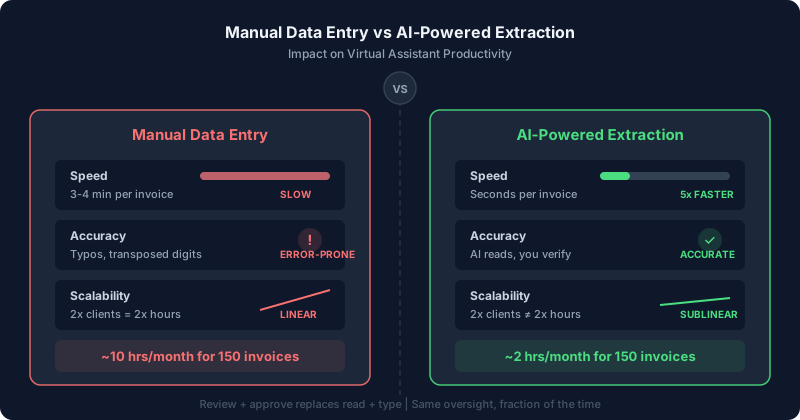
- Each invoice takes 3-4 minutes to process manually (open email, read PDF, log vendor, date, amount, VAT, description)
- That’s 450-600 minutes per month - 7 to 10 hours - just on data entry
Those hours are billed to your clients. But they’re also hours you can’t use for other clients, or for tasks that actually require your judgement and expertise.
Now imagine processing the same 150 invoices in 2 hours instead of 10. That’s not a marginal improvement - it’s a transformation in how many clients you can realistically serve.
What AI Extraction Changes
AI-powered invoice processing tools don’t just speed up data entry - they change the nature of the task.
Instead of doing data entry, you’re reviewing data entry. The AI reads the invoice, extracts the fields, and presents them to you for verification. You check that the numbers are right, make any corrections, and approve the sync. The cognitive load drops dramatically, and so does the time per invoice.
The verification step still requires your attention and judgement - you’re the professional who catches when a total doesn’t add up, or when a supplier’s VAT number looks wrong. That part of the job is genuinely valuable. The typing is not.
The Scalability Argument
Here’s the key insight for VAs who want to grow their practice:
Manual data entry scales linearly. Double your clients, double your hours. Your earnings grow, but so does your workload.
AI-assisted data entry scales differently. Taking on an additional client with 30 more invoices per month might add 30 minutes to your workflow instead of 3 hours. The marginal cost of each new client drops significantly.
This means you can either:
- Take on more clients at your current hourly rate and dramatically increase revenue
- Reduce the hours billed per client (making yourself more competitive) while keeping the same income
- Shift the mix - fewer hours on data entry, more hours on higher-value work that clients are willing to pay more for
None of these options exist if you’re tied to manual processing.
Practical Setup for Client Bookkeeping
Here’s how a practical workflow looks for a VA using AI extraction tools:
A dedicated email address for each client's financial correspondence, or Gmail labels to separate invoices. Keeps things clean and prevents cross-contamination.
Each client gets a copy of your standard ledger template consistent columns for date, vendor, description, net amount, tax, total, and category.
Rather than processing invoices as they arrive, batch them once or twice a week. Consistency matters more than speed.
Mail2Ledger works directly inside Gmail. Open an invoice, the add-on reads the content (including PDF attachments), extracts the financial fields, and syncs them to the client's Google Sheet. Connect different Sheets for different clients process Client A, switch, process Client B.
At the end of each batch, spot-check the totals against the source documents. Flag anything unusual for the client. The part that requires your expertise and takes the least time.
What to Look for in an AI Extraction Tool
Not all AI extraction tools are created equal. For VA use specifically, the things that matter most:
You're dealing with many different suppliers across multiple clients. A tool that requires training on each supplier's format will cost more time than it saves.
If invoices arrive by email, you don't want to download PDFs, upload them to a separate tool, and copy results back. Native integration removes those steps.
Your clients are almost certainly on Google Workspace. A tool that connects Gmail to Sheets directly is far simpler than one that exports CSV files.
You need to see what's being extracted before it goes into the client's ledger. Automatic sync without review is a risk you don't want to take with client data.
Mail2Ledger checks all of these boxes - it’s a Gmail add-on, uses Gemini AI (so no per-supplier templates), syncs directly to Google Sheets, and puts you in the review loop before anything is committed. It’s free during early access.
Ready to Reclaim Those 8 Hours?
You became a virtual assistant to build something on your own terms - not to spend half your week typing invoice numbers into spreadsheets. The math we walked through earlier tells the story: 10 hours of manual data entry can become 2 hours of review and oversight. That’s 8 hours back every month - enough to take on 2-3 more clients, move into higher-value advisory work, or simply stop working weekends.
Mail2Ledger is free during early access, so there’s no cost to find out what your practice looks like without the data entry bottleneck. Install it from the Google Workspace Marketplace, connect it to a client’s Google Sheet, and process a batch of invoices. Most VAs see the difference within the first 15 minutes.
Your expertise is in managing client finances, catching errors, and providing the judgement that no tool can replace. Let the AI handle the typing so you can focus on the work that actually grows your business.